When an email account stops working
The statuses on Email accounts, the automatic checks, the email you get, a full mailbox and the DNS warnings.
When an email account can't send or read replies, SalesBullet stops using it, says why on Email accounts and keeps checking it. Its campaigns go on from your other accounts; leads it already wrote to wait for it.
The statuses
- Active — it works.
- Paused — you clicked Pause on its row: no campaign emails, but replies are still read and answered in the MasterInbox. Resume starts it again.
- Checking… — just imported or bought: its login is being tried.
- Disconnected — the login was refused: a wrong or changed password, a deleted app password, or a Microsoft sign-in that no longer works.
- Error — anything else: a server that can't be reached or can't take the login right now, or a provider that refused to send.
- Stopped (Free plan) — your plan has been Free for a while: replies aren't read and warm-up is off. Upgrade and it starts again (plans).
The reason is under the status, such as "Sending (SMTP): The SMTP login was refused — check the username and password." An account stops after 3 refused logins in a row, after 5 connection problems in a row, or at once when its provider refuses to send.
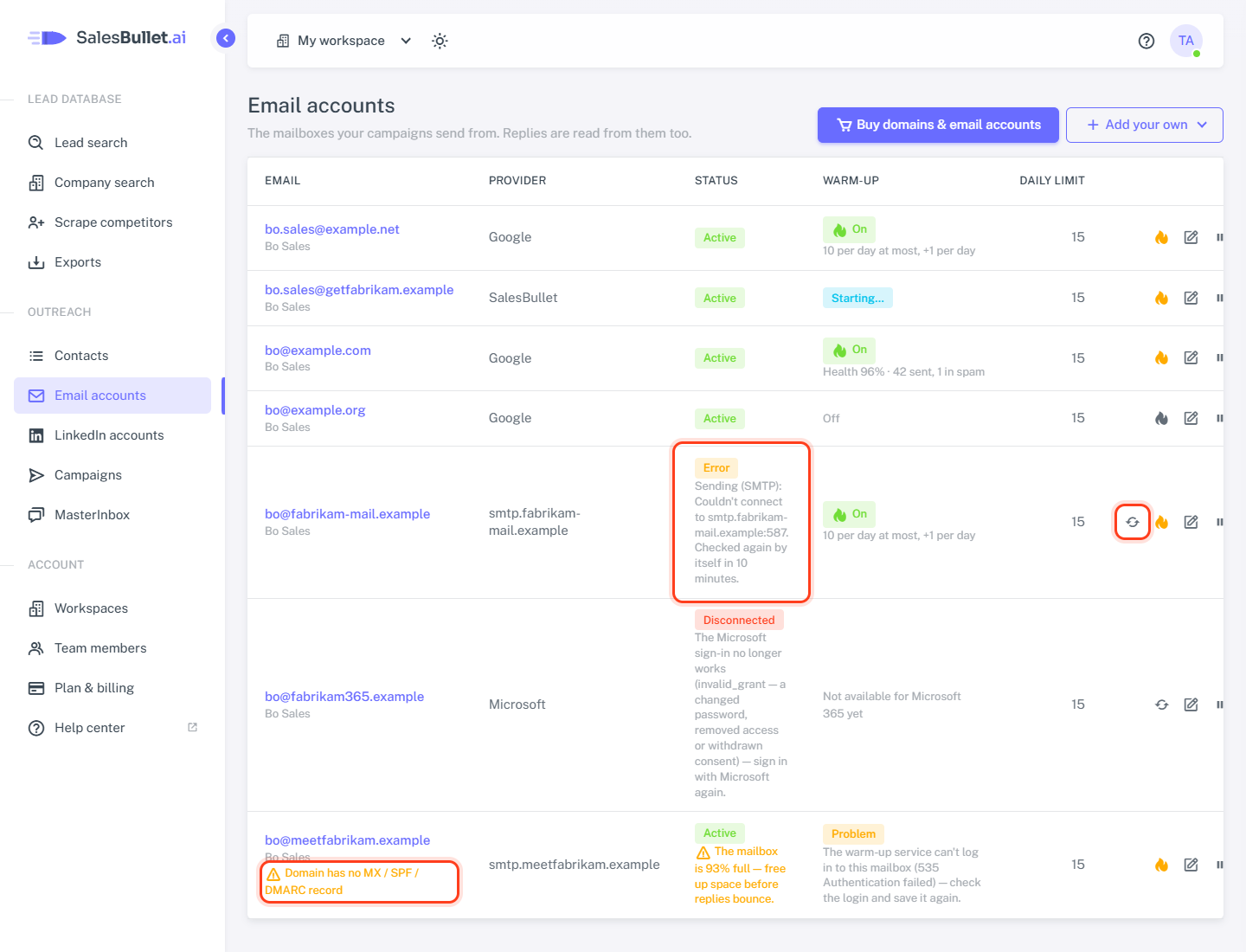
Checked again by itself
A stopped account is tried again 15 minutes after it stopped, then after 1 hour, 6 hours, and daily — the list says when: "Checked again by itself in 15 minutes." Once a check passes, it's Active and sends again by itself. Fixed something? Click Check again (↻) on its row to try it now.
- A wrong password: click the account's address, type the new one — for Gmail a new app password — and click Save. Save checks the login first.
- A Microsoft sign-in that no longer works isn't checked by itself — sign in again.
When an account stops while sending or reading replies, whoever connected it — or the workspace's owner — gets an email, "… stopped sending", with the reason and what to do. At most one a day per account.
A full mailbox
Where the mail server tells, the list warns at 90% full. At 98% the account stops sending — replies to it would bounce — and its owner gets an email. Delete or archive old mail; sending starts again after the next check.
Domain has no MX / SPF / DMARC record
The list checks each account's domain and names what's missing:
- MX — where replies arrive.
- SPF and DMARC — prove the emails really come from you. Without them, cold emails land in spam.
Ask whoever manages the domain's DNS to add them — your email provider's help gives the values. The check looks for a
TXT record on the domain starting with v=spf1, and one on _dmarc.yourdomain.com starting with v=DMARC1. The
warning goes within an hour of the fix. It never stops sending; Gmail, Outlook.com and other big free providers aren't
checked.