Connect any other mailbox (IMAP / SMTP)
Any provider's mailbox with its IMAP and SMTP servers: the ports, the login, the test and typical errors.
Any mailbox that offers IMAP and SMTP can send your campaigns: SMTP sends the emails, IMAP reads the replies. Your provider's help pages list its server names and ports.
Fill in the form
- Open Email accounts, click Add your own and choose Any provider (IMAP / SMTP).
- Email address — when you leave the box, SalesBullet looks up the servers. Found: "Servers filled in for you — test the connection to be sure." A Google Workspace or Microsoft 365 address is pointed to its own way instead: Gmail or Microsoft.
- Sender name — the name your leads see. Left empty, they see the email address.
- Password — the mailbox's password.
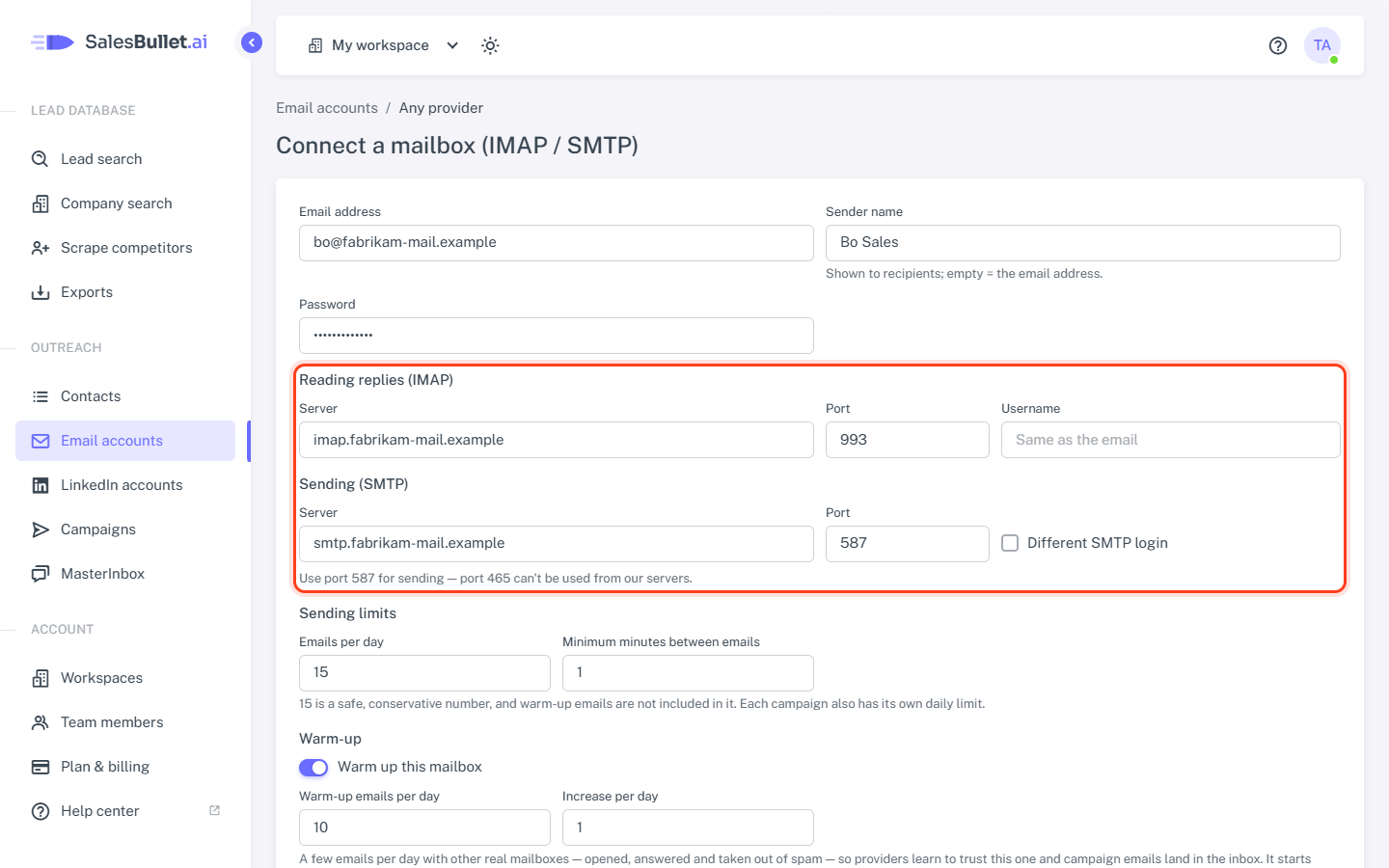
- Reading replies (IMAP) — Server, Port (usually 993) and Username (left empty: the email address).
- Sending (SMTP) — Server and Port (usually 587). A different login for sending? Tick Different SMTP login and fill in SMTP username and SMTP password.
- Click Test connection, then Connect.
There's no security setting: it follows the port — SSL on 993, STARTTLS on 587.
Important
Use port 587 for sending — port 465 can't be used from our servers.
The test
Test connection logs in to both servers and sends nothing. Each line — Sending (SMTP) and Reading replies (IMAP) — says "works" or what went wrong. Connect checks again and saves the mailbox only when both work.
Typical errors
- "The IMAP login was refused — check the username and password." — a typo, or the provider wants an app password instead of the normal one.
- "There is no server called …" — the server name is mistyped.
- "Couldn't connect to …:465. Our servers can't use port 465 — use 587 with STARTTLS."
- "Couldn't connect to …" or "The secure connection to … failed — check the port and security" — that port is wrong for the server: try 993 for IMAP and 587 for SMTP.
- "The certificate of … is for …, not for … — use … as the server (usual with shared hosting)." — use the server name the message gives.
Copies in the Sent folder
Most providers keep a copy of what you send. The first campaign email shows whether yours does — if not, SalesBullet adds a copy of each email to your Sent folder. To choose yourself, click the mailbox's address on Email accounts and set Copies of sent emails in the Sent folder to SalesBullet adds a copy of each email or Don't add copies.