Schedule: when messages go out
Choose the days and hours your campaign sends in, its time zone — and, if you like, the day it starts.
Updated 1 October 2026
The Schedule tab sets when a campaign sends — its emails and its LinkedIn steps. Outside these hours nothing goes out; what's due waits for the next window.
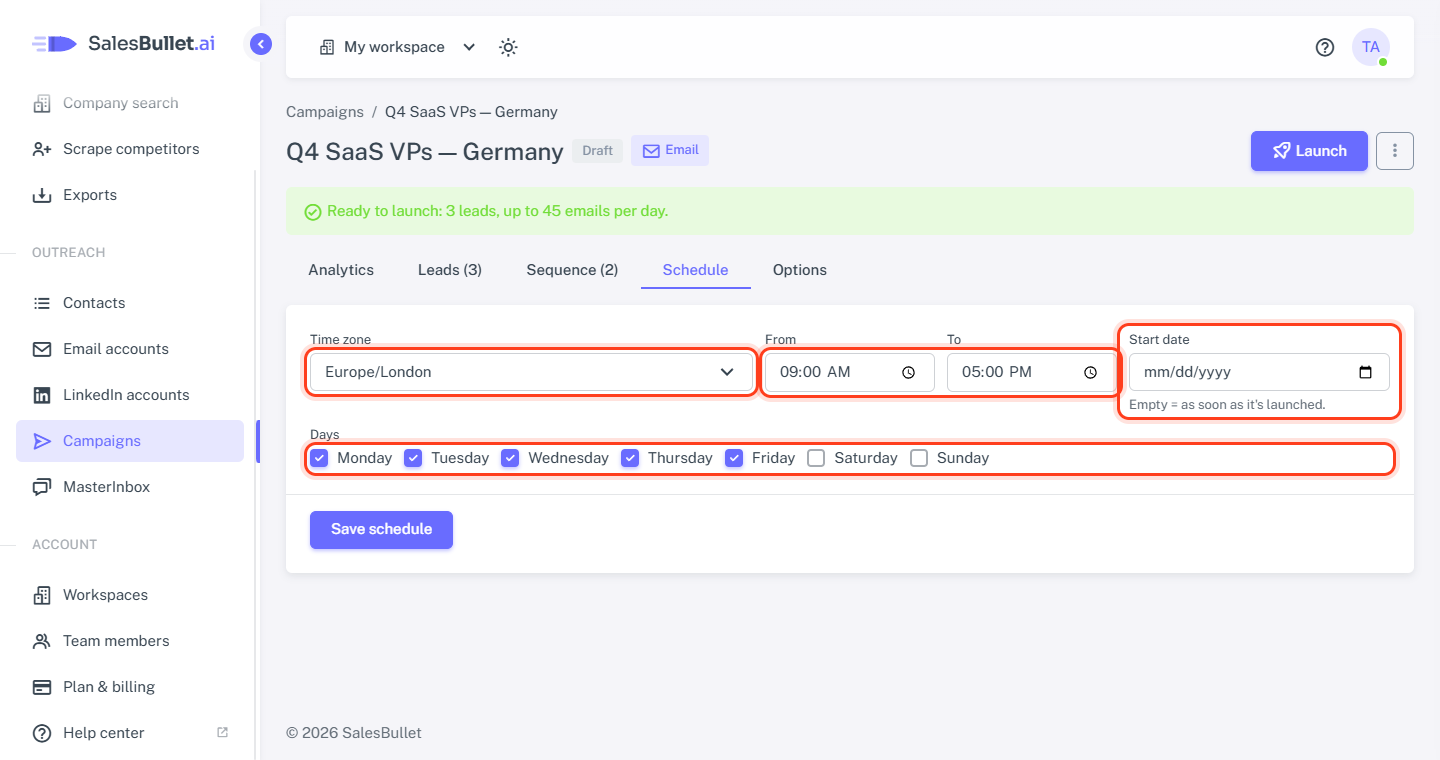
The settings
- Time zone — the hours and days below are in this time zone. A new campaign starts in your browser's.
- From and To — the sending window, 09:00 to 17:00 at first. It ends after it starts, on the same day.
- Start date — the first day it may send. Empty = as soon as it's launched.
- Days — the days of the week it sends, Monday to Friday at first.
Click Save schedule. A campaign without a day can't launch: "Choose at least one sending day (Schedule)."
How it fits with the rest
- Waits: "3 days after step 1" counts from when step 1 went out; the follow-up then goes in the next window. An email sent on Friday with a 3-day wait goes on Monday.
- Pace: the emails don't all go at 09:00. Each email account sends one at a time, minutes apart, as set on the Options tab — and no more than its daily limit.
- The campaign's day runs from midnight to midnight in its time zone. It's the day of Emails per day and Max new leads per day on the Options tab, and of the chart on Analytics.
- One schedule for all its leads. To reach people in another part of the world in their working hours, give them a campaign of their own, in their time zone.
Note
A campaign launched with a start date ahead shows Active, but no emails or LinkedIn steps go out before that day.
More in Campaigns
Create a campaign and add leads
Name a new campaign, choose its channels, add the people on your contact lists as its leads — or duplicate one.
Write your sequence
Write your first email and its follow-ups, set the days between them and check them in the flow, as one of your leads gets them.
Variables and fallbacks
Put each lead's own details into your messages — and say what goes there when a detail is missing.
Spintax: vary your wording
Write {Hi|Hello|Hey} and each lead gets one of the options, so your messages don't all read the same.
A/B test your emails
Send up to five versions of an email to different leads and see which one gets more replies.
Auto Enrichment: research each lead
Looks each lead up on the web — company news, their posts, hiring — for a personal intro.
Auto Personalization: a personal intro for each lead
AI writes each lead a short personal opening line; the rest of your message stays the same.
Send leads to Clay, Make, n8n or Zapier
The Webhook step sends each lead to your own tool and puts what it sends back into your messages.
Campaign options
Choose the accounts a campaign sends from, how fast it sends, and when a lead stops.
Launch, pause and resume
What a campaign needs before it launches, what pausing does, and when a lead or a campaign stops by itself.
Campaign analytics
What a campaign sent, who replied and the opportunities it made — in total, day by day and per step.